
I missed a package delivery a while back simply because I had no idea it had shipped — I found out only when I happened to check the order status days later. Since then I’ve made a point of actually turning on order notifications instead of relying on remembering to check manually.
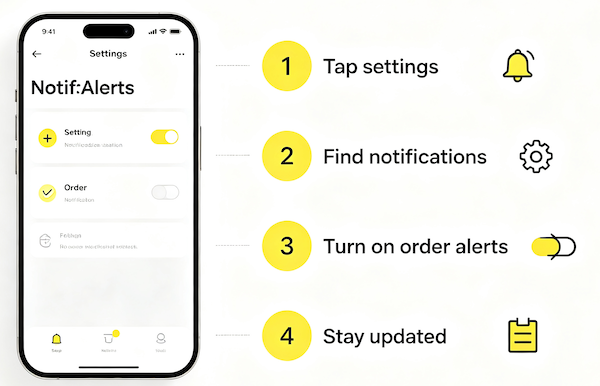
What Order Notifications Cover
These alerts are tied specifically to purchases you’ve made — think shipping confirmations, out-for-delivery updates, and delivery confirmations — rather than the general social notifications you’d get from likes or comments.
Turning Them On
The setting lives under your account preferences rather than anywhere on the product or order page itself, so it’s a one-time setup rather than something you toggle per purchase.
- Go to Settings and Privacy
This is accessible from your profile menu and is where most account-level preferences, including notifications, are managed.
- Open Notifications and enable Order Updates
This is the specific toggle that controls alerts about shipping, delivery, and other order-related changes.
- Confirm push notifications are allowed on your phone
The in-app toggle only works if your device’s own settings also permit TikTok to send push alerts.
- Check per-seller notification options if available
Some sellers offer additional alert options tied specifically to their shop, separate from the general app-wide setting.
Notifications vs Checking Manually
Once notifications are on, you shouldn’t need to manually open your order status page just to see if something shipped — the update comes to you instead. If alerts still aren’t coming through after setup, it’s worth working through the common fixes for notifications that stop working.
FAQ
Do order notifications come on automatically after a purchase?
Not always — it depends on your existing notification settings, so it’s worth checking after your first order rather than assuming they’re on.
Will I get a notification for every stage of shipping?
Typically for the major milestones — shipped, out for delivery, delivered — rather than every individual carrier scan.
What if I’m not receiving order notifications even with them enabled?
Check your phone’s system-level notification permissions for TikTok, since an in-app toggle can be on while the device is still blocking alerts.
Can I turn off order notifications without turning off everything else?
Yes, order updates are typically a separate toggle from general social or marketing notifications, so you can keep one on without the other.