
I have a bad habit of finding things on TikTok Shop at exactly the wrong time — usually right before bed, definitely not when I want to enter my card details. For a while that meant I’d just… lose the product. Close the app, forget the name, never see it again. Turns out there’s a heart icon sitting right there the whole time that solves this, and it took me embarrassingly long to actually use it.
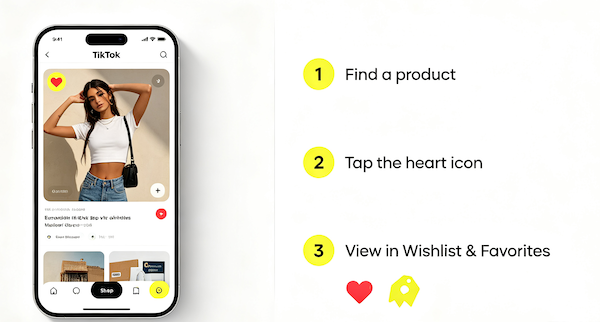
The Heart Icon Is Your Wishlist
When you’re looking at a product on TikTok Shop — whether it’s from a shoppable video, a LIVE, or the Shop tab itself — you’ll usually see a small heart icon next to the product image or listing. Tapping it saves the item to a list TikTok calls Wishlist & Favorites, without adding it to your cart or committing to anything.
It’s a genuinely useful middle step between “I saw this” and “I bought this,” especially since shoppable videos tend to show up once in your feed and then disappear into the algorithm’s memory, not yours.
Where Saved Products Actually Go
Everything you heart ends up in one place: your Wishlist & Favorites, accessible from your profile or from the Shop tab’s menu. It’s organized as a simple grid of saved items, each with its price and a direct link back to buy it when you’re ready.
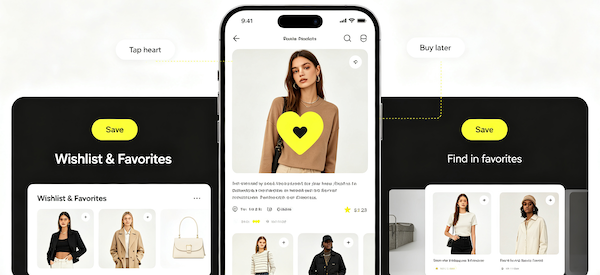
- Find a product
Come across an item in a video, LIVE, or the Shop tab that you want to remember later.
- Tap the heart icon
It’s usually right on the product card or video overlay — one tap saves it, no confirmation needed.
- View in Wishlist & Favorites
Find every saved item in one list from your profile whenever you’re ready to buy.
Wishlist vs. Cart — They’re Not the Same Thing
It’s worth being clear about this: saving a product to your wishlist doesn’t reserve it, hold a price, or guarantee stock. It’s just a bookmark. If something’s genuinely selling out fast, saving it for later still carries the same risk as leaving anything else in a browser tab — it might be gone by the time you come back.
A Few Things I Wish I’d Known Sooner
Prices on TikTok Shop can and do change, so a saved item might not be the same price a week later — I’ve had it go both ways, cheaper and more expensive. I’d also recommend actually opening your Wishlist every so often instead of only adding to it, since it’s easy to let it turn into a graveyard of stuff you meant to buy. If you’re trying to decide whether something’s worth pulling the trigger on, it’s worth checking whether the seller and listing look legitimate before you do.
FAQ: Saving TikTok Shop Products
Do saved products expire?
No, items stay in your Wishlist & Favorites indefinitely unless you remove them yourself or the seller takes the listing down entirely.
Can I save a product without a TikTok account?
No. You need to be logged in to save items — the wishlist is tied to your account, not stored locally on your device.
Will I be notified if a saved item’s price drops?
TikTok sometimes surfaces price or stock changes on saved items, but it’s not guaranteed for every listing, so it’s worth checking back manually if you’re waiting on a specific item.
Can sellers see that I saved their product?
Sellers can generally see aggregate engagement on their listings, but they don’t get notified about individual users saving a specific item.