
The first TikTok LIVE I ever sat through, I told myself I’d watch for two minutes out of curiosity. Forty minutes later I’d watched a host try on the same jacket four times in four colors and I genuinely knew more about the stitching than I know about half the things I own. LIVE shopping is a different animal from scrolling past a shoppable video, and it’s worth understanding before you fall into one.

How TikTok LIVE Shopping Actually Works
A seller or creator goes live and talks through products in real time — trying them on, demonstrating how they work, answering questions typed in the comments as they come in. A row of tagged products sits at the bottom of the screen the whole time, and whatever the host is currently talking about is usually pinned or highlighted.
It’s basically a live infomercial you can talk back to, except the “buy” button is right there on the same screen.
Step by Step: How to Buy During a LIVE
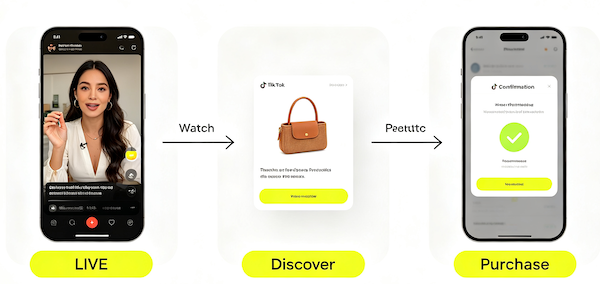
- Watch the LIVE
Tap into any stream showing the red LIVE badge, either from your following feed or the dedicated LIVE tab.
- Discover the product
Tap the product shelf at the bottom of the screen to see what’s currently featured, with a price and a short description.
- Complete the purchase
Tap the product to open its page and check out — the stream keeps playing in a small window while you finish.
Why Sellers Use LIVE Instead of Regular Videos
LIVE gives sellers two things a regular video can’t: real-time proof and urgency. You can ask a question in the comments and actually get an answer on camera, which does a lot to build trust compared to a caption or a pinned comment. And a lot of hosts run limited-time pricing that’s only active while they’re live — a countdown timer, a “next 20 buyers only” discount, that kind of thing.
Is It Worth Watching?
Depends what you’re after. If you already know you want a category of product and you’re on the fence about a specific one, watching a few minutes of a live demo can genuinely tell you more than five written reviews — you see the fit, the texture, the real size next to a real person. The prices are also sometimes better than the standalone listing, at least for the duration of the stream.
The trade-off is time and pressure. Countdown timers and “only 3 left” messaging are designed to get you to decide fast, and that’s exactly when it’s easiest to buy something you wouldn’t have chosen with a clear head. If a deal feels rushed, it’s fine to screenshot the product and check it out later once the stream has ended — most tagged products are still purchasable from the seller’s shop page after the LIVE ends, just without the live-only price.
A Few Things I Wish I’d Known Sooner
Not every LIVE is worth your time — some hosts are just reading a script on loop with no real demonstration happening. Give it 60 seconds; if nobody’s actually showing or explaining the product by then, it’s usually not going to get more useful. And the same seller-vetting rules apply here as anywhere else on TikTok Shop — check the storefront’s rating before you buy, live pricing or not. We cover exactly what to check in our TikTok Shop safety guide. If you’re curious, How to Find the TikTok Shop Tab covers related ground.
FAQ: TikTok LIVE Shopping
Can I buy something during a TikTok LIVE without waiting for it to end?
Yes. Tapping a product in the shelf opens its page immediately, and you can check out while the stream keeps playing in a small window.
Are TikTok LIVE prices actually cheaper?
Sometimes. Hosts often run limited-time discounts only active during the stream, though the same product is usually still available afterward at its regular listing price.
What happens if I miss a LIVE deal?
The tagged products are typically still purchasable from the seller’s shop page after the stream ends, just without the live-only pricing or timer.
How do I know when a seller I follow goes LIVE?
TikTok can notify you when accounts you follow start a livestream, and active LIVEs also surface in your following feed and the dedicated LIVE tab.